Checklists get their own home in Shift Amp
Checklists now have their own Tasks page, with starter checklists to build from and a view of how today's shifts are tracking. You can also link a checklist to wiki pages, so the how-to sits right next to the step.
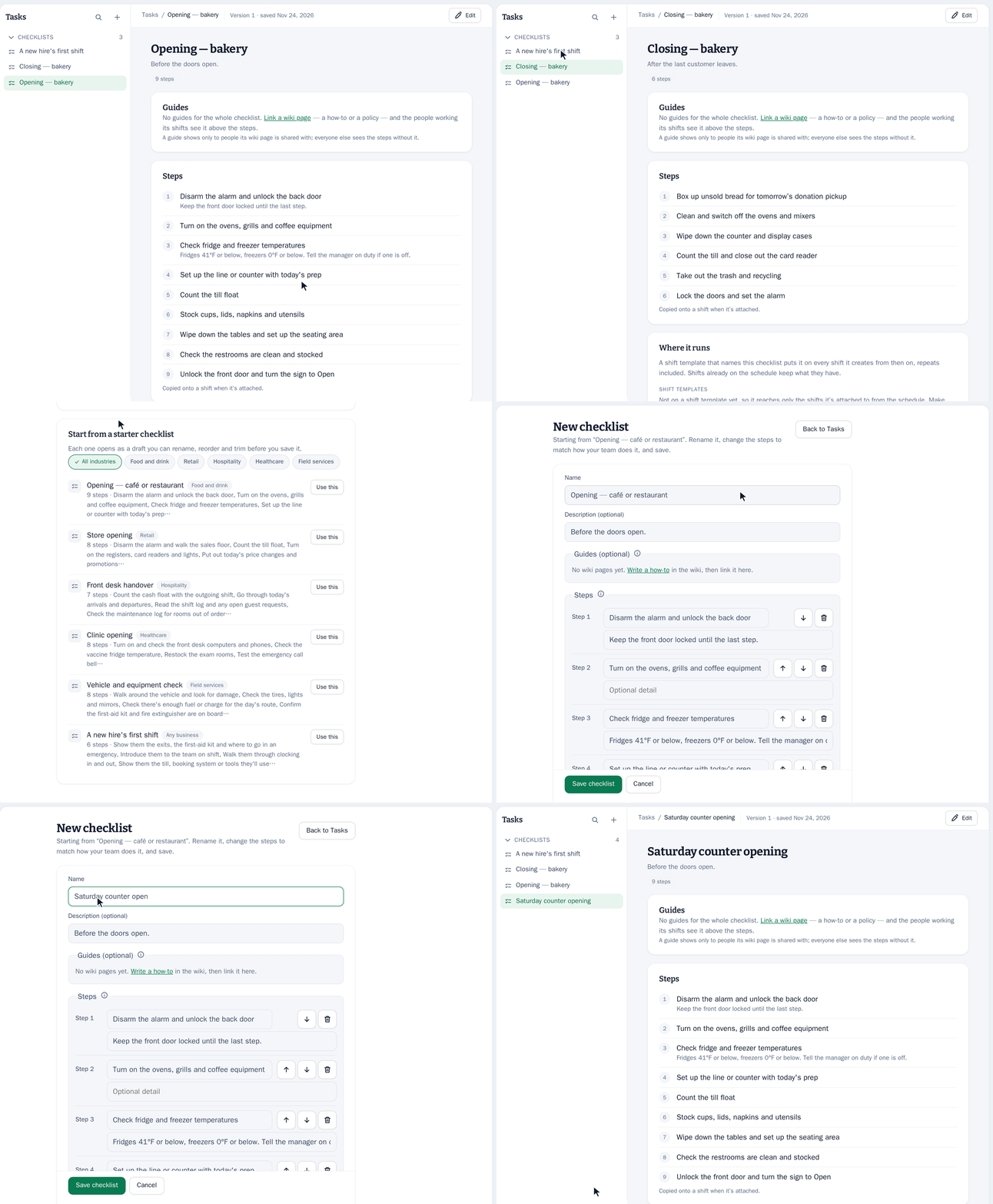
Every checklist in one place
Open Tasks in the sidebar, under Manage, to see every checklist your team uses. Each one shows its steps, the shift and week templates it runs on, and the shifts that used it in the last 7 days.
A head start if you're new to checklists
The first time you open Tasks, Shift Amp offers six starter checklists, including store opening, front desk handover and a new hire's first shift. They're ordered for your industry, and you can edit any of them before you use it.
Today shows how checklists are going
Today now has a Checklists section with a row for every shift that has one. Each row shows who's on the shift and how many steps are done. A shift is only flagged if it ended with steps still open.
Put the how-to next to the step
A checklist can link up to three wiki pages as guides, and each step can link one more. Your team sees the guide right where they need it, and opening a guide never ticks the step off. Each wiki page also lists the checklists that use it.
Also in this release
- NewThe printed schedule now shows closed days and approved time off, so the sheet you post matches the schedule. Time off prints as "Time off" without the type of leave or any notes.Employee scheduling
- NewBrand-new accounts get a Finish setting up list on Today that walks through adding your team, inviting them, and building and publishing your first week.
- ImprovedChange one shift in a published week straight from that shift's panel.Employee scheduling
- ImprovedAdd a shift to a published week from an empty cell or the Add shift button, in a few clicks.Employee scheduling
- ImprovedBefore you publish, Shift Amp tells you who won't see the week yet because they haven't joined.Employee scheduling
- ImprovedA new shift added from someone's row starts with their position and location.Employee scheduling
- ImprovedThe Time clock board leads with who's scheduled but not clocked in, and refreshes on its own.Employee time clock
- ImprovedClick a row on the Time clock board to open that entry on the timecard, or the shift on the schedule.Employee time clock
- ImprovedReports has a Next week option, and a report with no data yet points you to the nearest published week.
- ImprovedConfirm your currency right where you enter a first pay rate.Labor costs
Try it on your week.
Free for your whole team. Every new team starts with 14 days of everything.
No credit card required.