Everything you need to schedule your team.
Build the week, track hours and keep everyone up to date, all in the same app your team uses to check their shifts. No payroll, no add-ons.
Free for your whole team. No credit card required.
- Build your first week in minutes
- Scheduling, time, labor and messages together
- Scheduling free for your whole team
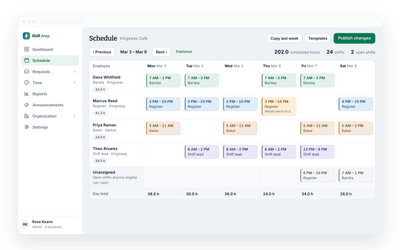
The three big jobs
Save hours, control the spend, keep everyone informed.
Most of what a shift manager does falls into three buckets. Shift Amp is built around them rather than around a feature list.
Build and manage schedules in minutes
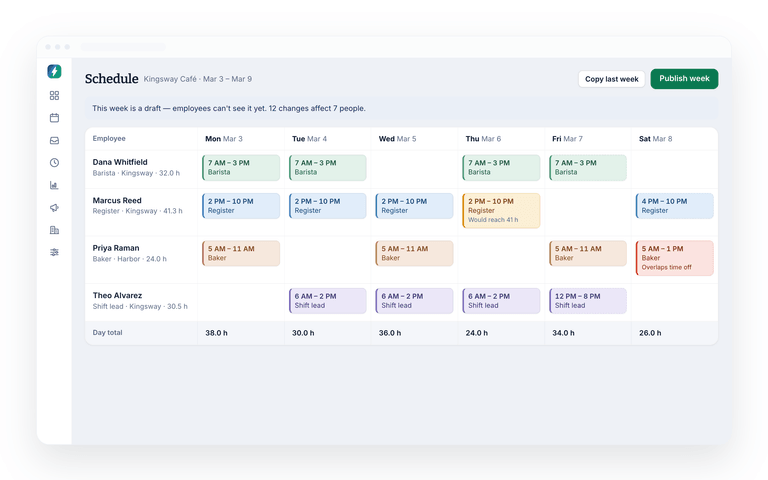
Build the week in one go or start from a template you already trust. Manage every scheduling job in one place and keep everyone current when it changes.
- Build a week in minutes, or reuse one you saved
- Time-off requests, availability and shift trades in one place
- Everyone knows who is working when, from any device
- Changes reach your team the moment you publish them
Also included
The parts that make the rest work.
Not everything needs its own page. These come with the app and quietly remove a job you are currently doing by hand.
Reports
Pull labor data for a day, a week, a month or a period you define, then use it to change what next week looks like.
Paid time off
Cap PTO by the leave types your business supports and approve incoming requests against what each person has left.
Wiki pages
Keep standing information in one place, and ask everyone to confirm they've read it.
The rest of Shift Amp
Every feature, one page each.
The full set, in the order most teams adopt them.
Employee scheduling
Build the week on a grid, publish it, and approve the changes your team asks for.
Learn moreEmployee time clock
Accurate clock-ins and timesheets that are ready for payroll.
Learn moreLabor costs
See what a shift costs while you are still building it.
Learn moreTeam communication
Messages, group chats and channels next to the schedule.
Learn moreTask management
Assign the shift's work and see what actually got done.
Learn moreEmployee breaks
Break rules applied to shifts automatically, with reminders on the floor.
Learn moreEmployee documents
Licenses, contracts and certifications, with alerts before they expire.
Learn moreMulti-location scheduling
Staff several sites from one schedule and compare them side by side.
Learn moreFAQ
The platform, answered.
What does Shift Amp actually do?
It's a scheduling app. You build the week, your team sees it on their phones, and swaps and time-off requests come to you to approve. It also has a time clock and team messaging. It doesn't do payroll, and there are no add-ons.
Do I have to use all of it?
No. Most teams start with scheduling because that is the sharpest pain, then add the time clock, then labor costs. Nothing has to be switched on before you are ready for it.
How big a team is it for?
Whether you are managing five people or five hundred, the same tools fit. The free plan has no cap on team size, and Shift Amp scales up to multi-site groups running several locations across different states.
What kind of businesses use it?
Anything that runs on shifts. Restaurants, retail, hotels, healthcare, entertainment, call centers, education, nonprofits, emergency services and caregiving all schedule the same way underneath, which is why the same tools fit.
How long does it take to set up?
You can build your first week in minutes. Adding wages, break rules and locations takes a bit longer, and most teams do that over their first week or two rather than up front.
Does it work on a phone?
Yes, and for most of your team that is the only way they will ever use it. Your team checks shifts, picks up open shifts, clocks in and reads messages on mobile. Managers can run the whole thing from one too.
What does it cost?
Scheduling is free for your whole team, at any size, with no credit card. Pro adds the time clock, timesheets, reports and more for $2 per billable member a month, and every new team starts with 14 days of everything free.
Can I move over from a spreadsheet?
That is where most of our customers come from. Build your first schedule alongside the spreadsheet if you want to, publish it when it looks right, and stop maintaining the old one.
Pricing
All the schedule. None of the bloat.
No add-ons, no per-location fees, no surprises. Just a schedule your whole team can count on, and it's free for all of them.
Free
For any number of people.
- The schedule, with open shifts, shift swaps and coverage
- Availability and time-off requests
- Labor cost estimates as you build the week
- Messaging with photos and documents, and shift tasks
- iOS and Android apps for everyone on the team
- No credit card
Pro
Every member counts, from the first. No cap on team size.
- Everything in Free, plus:
- A time clock on phones and shared kiosks, with location checks
- Timesheets and approvals
- Payroll-ready exports
- Reports on hours, coverage, labor cost and attendance
- Paid time off balances
- A wiki for your team's how-tos
From the blog
From the team.
Writing on scheduling, labor cost and running a business that works in shifts.

Scheduling Minors: Hour Limits and Work Permits in 20 States
Federal law caps hours only for 14 and 15 year olds, so the real limits on a teen's schedule live in state law. Here is how 20 states compare, with a worked week and the mistakes that cause violations.
October 23, 2026
Can You Change an Employee's Schedule Without Notice? What You Owe, by City
Federal law does not require notice before you change a schedule, but a growing list of cities makes late changes cost money. Here is the default rule, where it flips, and what each change costs.
October 22, 2026
Open Shift Pickup Rules: First-Come, Seniority, or Lottery
Who gets the open shift? A vendor-neutral guide to first-come, seniority and lottery pickup rules, the overtime check most policies skip, and a copy-paste policy.
October 21, 2026
Put the whole week in one place.
Start free, build your first schedule today, and add the rest when you need it.
Free for your whole team. No credit card required.