Bring your schedule and timesheets in from a spreadsheet
Moving to Shift Amp no longer means retyping. You can now import shifts and past timesheets from a spreadsheet or another scheduling app's export, check every row before anything is saved, and undo an import if it isn't right.
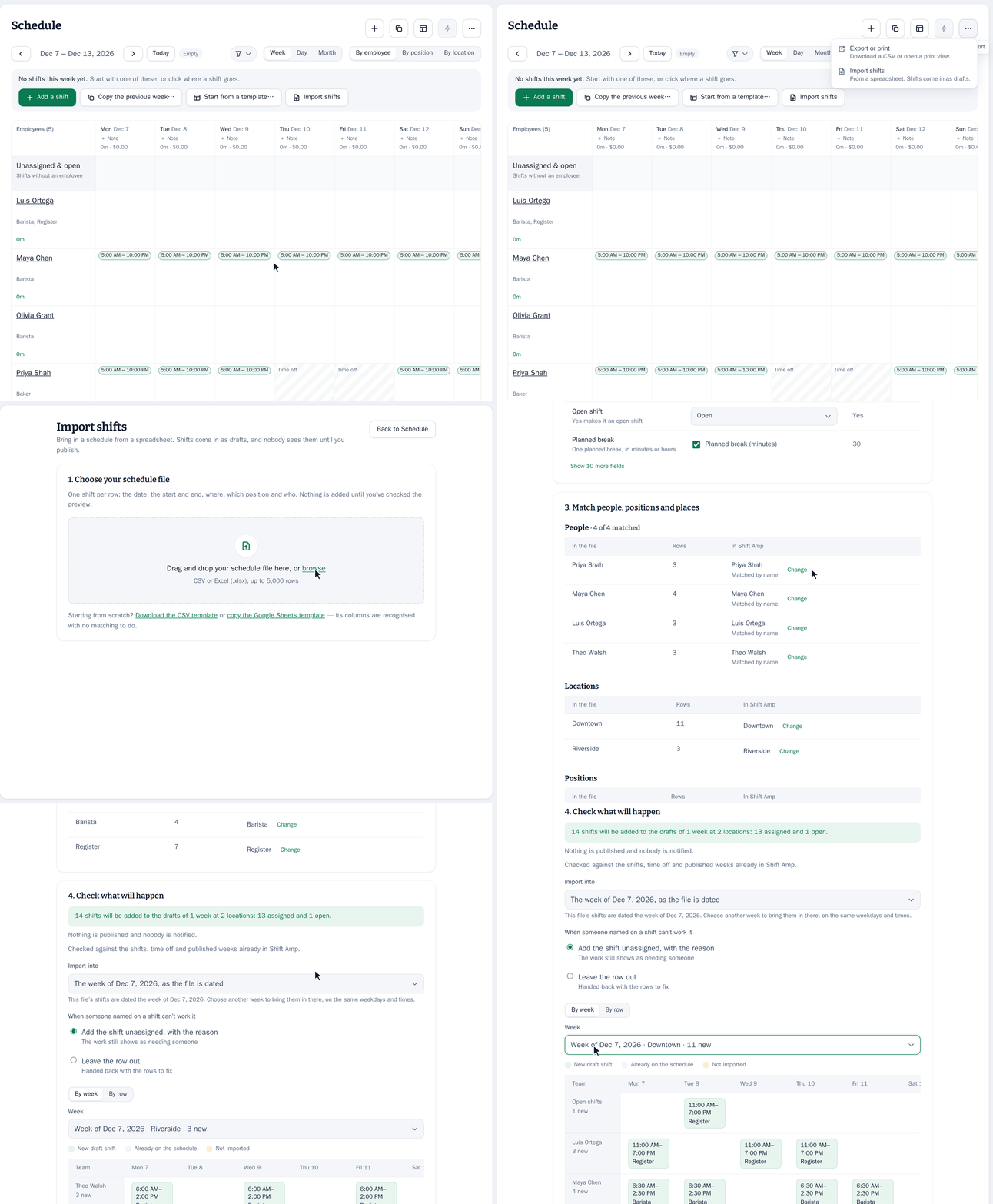
Import shifts
On the schedule, open the ⋯ menu and choose Import shifts. Upload your file, check how Shift Amp matched your columns and people, then confirm. Shifts come in as drafts, so nobody is notified until you publish the week like you normally would. A schedule exported from Shift Amp imports back in too.
Owners and operations admins can import for any location. Location managers can import for the locations they manage.
Import past timesheets
You can now bring in a whole period of past hours at once, from Shift Amp's template, a Google Sheets copy of it, a Shift Amp timesheet export or another app's export. You'll see what will happen to every row before anything is written, and you can undo the import afterwards.
Paid and unpaid breaks
Recorded breaks now carry a paid or unpaid status, so worked hours reflect how your business actually pays for breaks.
Also in this release
- ImprovedTimesheets has a new full-width review, and timecards read like the week they cover. Correcting an entry now takes one save.Employee time clock
- ImprovedIf someone forgets to clock out, the entry is marked Missing clock-out for you to fix, and they can still clock in for their next shift.Employee time clock
- ImprovedTimecard corrections no longer ask for a reason, and a time that can't be saved tells you which field and why.Employee time clock
- ImprovedWhen Auto-assign is unavailable it tells you why, and its preview names any locations it skipped and how to include them.Employee scheduling
- ImprovedExport and Import now share one menu on the schedule, each labeled in words.Employee scheduling
- ImprovedPublish buttons are green, and confirmation dialogs repeat the action you're confirming.Employee scheduling
- ImprovedThe sidebar keeps the width you chose on every page.
Try it on your week.
Free for your whole team. Every new team starts with 14 days of everything.
No credit card required.