Everybody knows what the shift needs.
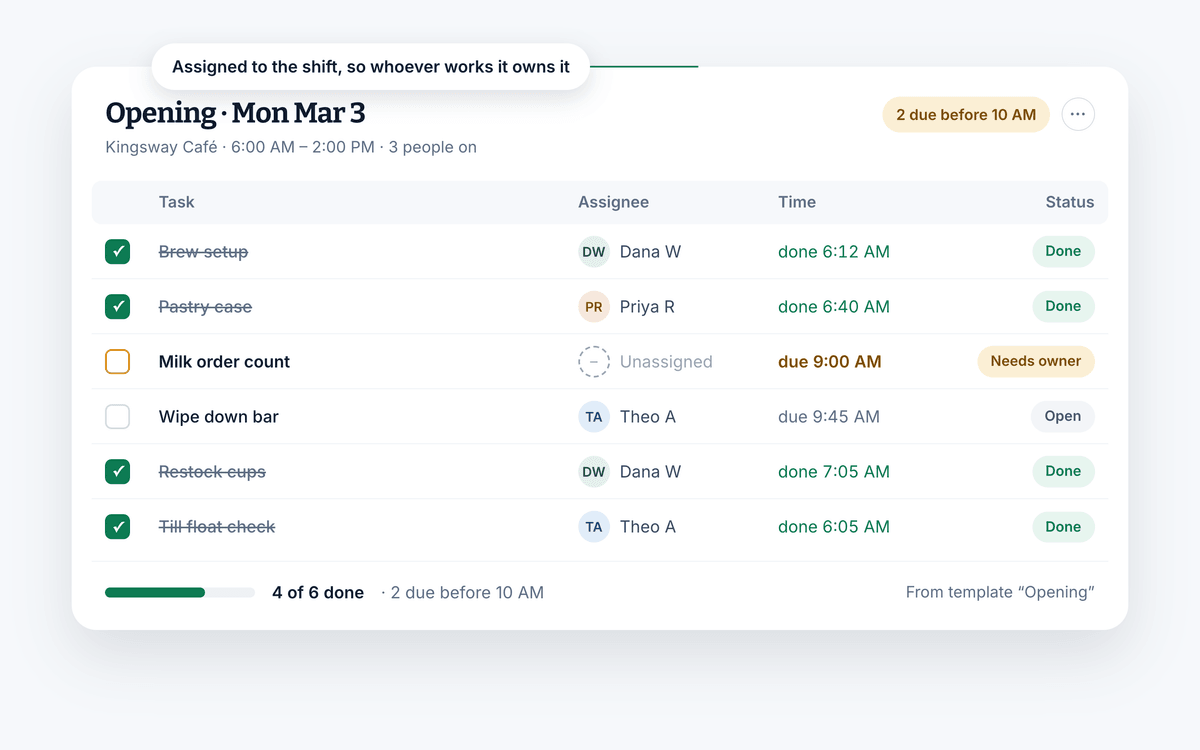
Attach a checklist to any shift, like opening or closing duties, and whoever works it checks items off in the app. You can see who finished each step and when.
Free for your whole team. No credit card required.
- Tasks attached to shifts, not just names
- Reusable checklists for recurring work
- Free for your whole team
What you can do
Delegate it, then stop chasing it.
Task management is four separate problems: handing the work out, making it unambiguous, knowing it happened, and not rebuilding the list every week.
Delegate once and watch it move
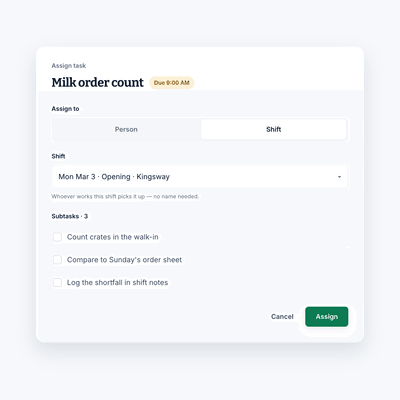
Hand a job to a person, or to a shift so whoever is working picks it up. Either way it is somebody's job, in writing.
- Assign tasks to an employee or to a shift
- Break a bigger job into a checklist of subtasks
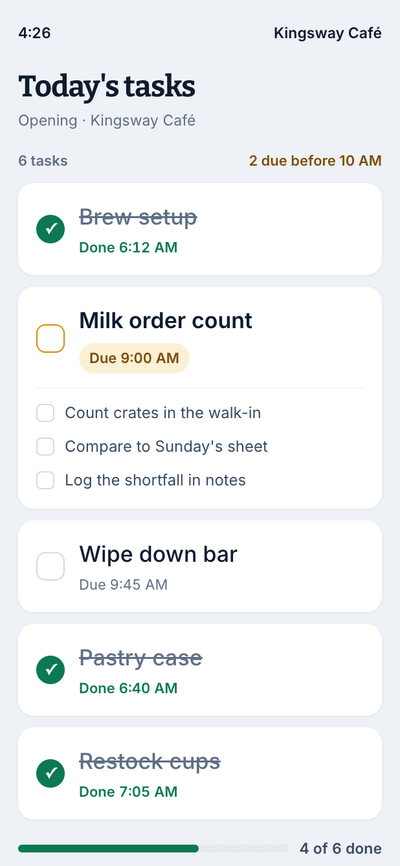
- Everyone sees their to-dos on their own phone
Why it helps
Where the shift usually loses time.
Everyone is aligned
Confusion about who owns what slows down any team. A list attached to the shift removes the question before it gets asked.
Instructions anyone can follow
Clear instructions are most of the difference between a job done once and a job done twice. Write them once, attach them to the job.
Less idle time on the clock
Work stalls when nobody knows what comes next. A visible list means the next thing is always obvious.
Compared to
Against the clipboard and the whiteboard.
Both work fine until the shift ends and the record goes with it.
| What you get | Shift AmpFree, or $2 per billable member for Pro | Whiteboard or clipboard |
|---|---|---|
| The list survives the shift | ||
| Your team sees it on mobile | ||
| Attached to the right shift | ||
| You can see what was completed | If you go and look | |
| Reusable for recurring work | Rewritten each time | |
| Reminders during the shift | ||
| Works across several locations |
iOS & Android
The list travels with the shift.
Your team is not at a desk. Tasks show up on the phone they are already carrying, in the same app they used to check what time they started.
- To-dos for the current shift, at a glance
- Check items off as the work happens
- Reminders so nothing waits until the last ten minutes
- Managers see completion without walking the floor
The rest of Shift Amp
More than a task manager.
Tasks make more sense when they are attached to the shift and the person working it.
Employee scheduling
Build the week on a grid, publish it, and approve the changes your team asks for.
Learn moreTeam communication
Messages, group chats and channels next to the schedule.
Learn moreEmployee time clock
Accurate clock-ins and timesheets that are ready for payroll.
Learn moreLabor costs
See what a shift costs while you are still building it.
Learn moreEmployee breaks
Break rules applied to shifts automatically, with reminders on the floor.
Learn moreEmployee documents
Licenses, contracts and certifications, with alerts before they expire.
Learn moreMulti-location scheduling
Staff several sites from one schedule and compare them side by side.
Learn moreLabor compliance
Break and overtime rules for every state, kept current.
Learn moreFAQ
Task management, answered.
What is task management?
It is the process of identifying a job, handing it to someone, and following it through to completion and review. In a shift business that usually means the recurring work a site needs done during each shift, rather than long-running projects.
Why does task management matter?
It is one of the things that separates a productive team from a merely busy one. It gives everyone clarity about what is theirs, stops work falling into the gap between two roles, and makes the output of a shift visible instead of assumed.
How do I manage work tasks?
Assign the task to the shift rather than chasing individuals. Whoever is working that shift picks it up when they clock in, and you see the completions without having to ask anyone how it went.
Is Shift Amp good for managing work tasks?
Yes. It's a scheduling app first, so checklists live on the shifts they belong to instead of in a separate tool.
Can I attach a checklist to a task?
Yes. A task can hold a list of subtasks, so a job like closing down the kitchen is one item on the shift with the actual steps inside it.
Can I reuse the same list every week?
That is what templates are for. Save the recurring work once, apply it to the shifts that need it, and spend your time on the exceptions instead of retyping the routine.
Will my team actually use it?
It sits in the app they already open to check their schedule, which is most of the battle. The tasks for the shift they are currently working are the first thing they see when they clock in.
What does it cost?
Scheduling is free for your whole team, at any size, with no credit card. Pro adds the time clock, timesheets, reports and more for $2 per billable member a month, and every new team starts with 14 days of everything free.
Pricing
All the schedule. None of the bloat.
No add-ons, no per-location fees, no surprises. Just a schedule your whole team can count on, and it's free for all of them.
Free
For any number of people.
- The schedule, with open shifts, shift swaps and coverage
- Availability and time-off requests
- Labor cost estimates as you build the week
- Messaging with photos and documents, and shift tasks
- iOS and Android apps for everyone on the team
- No credit card
Pro
Every member counts, from the first. No cap on team size.
- Everything in Free, plus:
- A time clock on phones and shared kiosks, with location checks
- Timesheets and approvals
- Payroll-ready exports
- Reports on hours, coverage, labor cost and attendance
- Paid time off balances
- A wiki for your team's how-tos
From the blog
Getting things done on a shift.
Writing on delegation, productivity and keeping a team organized.
Scheduling Minors: Hour Limits and Work Permits in 20 States
Federal law caps hours only for 14 and 15 year olds, so the real limits on a teen's schedule live in state law. Here is how 20 states compare, with a worked week and the mistakes that cause violations.
October 23, 2026
Can You Change an Employee's Schedule Without Notice? What You Owe, by City
Federal law does not require notice before you change a schedule, but a growing list of cities makes late changes cost money. Here is the default rule, where it flips, and what each change costs.
October 22, 2026
Open Shift Pickup Rules: First-Come, Seniority, or Lottery
Who gets the open shift? A vendor-neutral guide to first-come, seniority and lottery pickup rules, the overtime check most policies skip, and a copy-paste policy.
October 21, 2026
Give the shift a list.
Start free and hand out your first set of tasks this week.
Free for your whole team. No credit card required.