No phone needed: employees can now do it all on the web
Employees no longer need the phone app to use Shift Amp. From any web browser they can now pick up, give away and swap shifts, message the team, read and acknowledge the wiki and turn on notifications, along with their full schedule and hours.
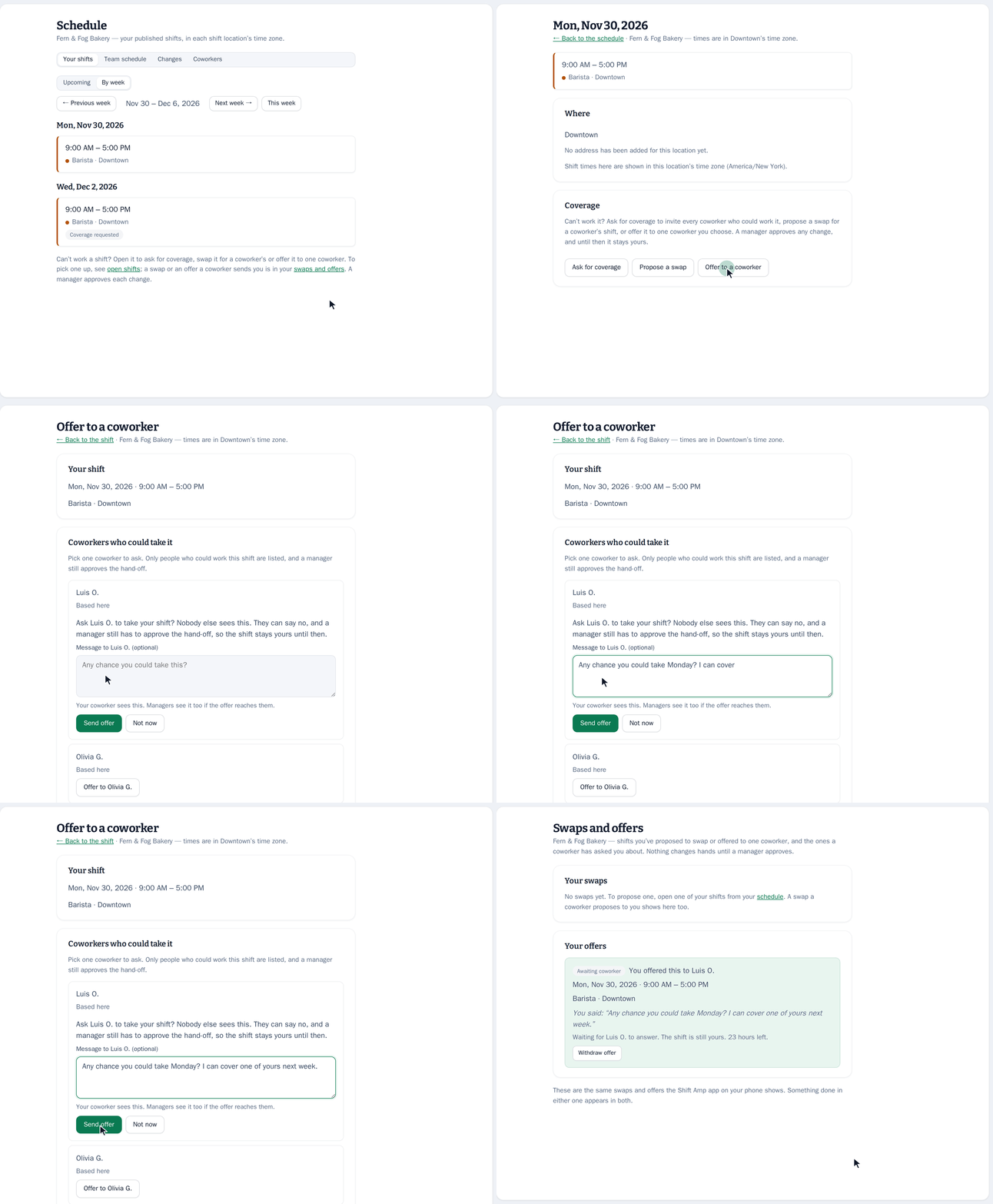
Pick up, give away and swap shifts
Open shifts, in the sidebar, lists the shifts someone can pick up: they click Claim shift, then Confirm claim. It also shows their claims and their coverage requests. On any of their own shifts, the Coverage section offers Ask for coverage, Propose a swap and Offer to a coworker, and Swaps and offers is where they accept or decline what coworkers send them.
Their whole schedule and their hours
Schedule now steps back and forward through weeks, with views for the Team schedule (when you share it), Changes to their shifts and Coworkers. Time clock pages back through earlier weeks, opens any entry to show its breaks and punches, and offers Report a shift with no punches. In Settings, Your record lets them update their preferred name, phone and, if you use kiosks, their kiosk PIN.
Messages, the wiki and browser notifications
Messages works on the web for employees, with their channels, direct messages and group chats. The wiki shows the pages shared with them, and they can acknowledge a page right there, so your acknowledgement records include people who only use a browser. In Settings, Notifications, under This browser, they can turn on browser notifications for swaps, open shifts and schedule changes.
Email when push is off
If someone has turned off push for a kind of notification but kept its email on, they now get the email. Signing out of a browser also turns off that browser's notifications, so email picks up from there.
Also in this release
- NewNew owners get a welcome email with their first setup steps, and people who join a team get one that explains how to sign in on a phone or in a browser.
- ImprovedClick anywhere in an empty part of a schedule cell to add a shift there, not just on the +.Employee scheduling
- ImprovedWhen a shift falls outside someone's availability, the shift dialog shows the hours they can work that day. A whole day of availability reads "All day".Employee scheduling
- ImprovedIn Time off, Availability and Coverage requests, click anywhere on a row to open it. After you approve or deny, Shift Amp offers the next pending request.Employee scheduling
- ImprovedUnpublished schedule reminders now come at most once for each week at each location.Employee scheduling
- ImprovedClick anywhere on a notification to open it.
- ImprovedOn the web, photos and PDFs in Messages open right in the page, with zoom.Team communication
- ImprovedClick a person's employment badge, like Active, to go straight to their Employment status.
- ImprovedOn a tablet, each shift's select box has a larger touch area, so selecting several shifts is easier.Employee scheduling
- ImprovedSigning in from a link takes you to the page the link was for.
Try it on your week.
Free for your whole team. Every new team starts with 14 days of everything.
No credit card required.