Ask your team to confirm a page
Tick Ask everyone to confirm they’ve read it when you publish or edit a wiki page, then open Audience to see who has acknowledged it.
You can ask everyone who can see a wiki page to confirm they've read it, such as a new dress code or a safety procedure. People confirm in the Shift Amp app, and you can see who has and who hasn't. Owners and operations administrators can do this on any page, and location managers on pages shared with a location they manage.
Ask for confirmation
- In the left menu, select Wiki. Open the page and select Edit, or select + (New page) to start one.
- Select the audience button at the top right, beside Publish page or Save changes.
- Tick Ask everyone to confirm they’ve read it.
- Select Done.
- Select Publish page, or Save changes if you're editing.
In the app's wiki, the page is marked "Needs acknowledgement" for everyone it reaches, with an Acknowledge button. People can confirm only in the app: there's no button for it on the web.
Shift Amp doesn't send a notification about the page, so let your team know it's waiting, for example in a channel.
See who has confirmed
- In the left menu, select Wiki, then select the page.
- Select Audience at the top right.
Under Acknowledgement, you see how many people have confirmed, such as "2 of 9 acknowledged", and each person's status: "Pending", or when they acknowledged.
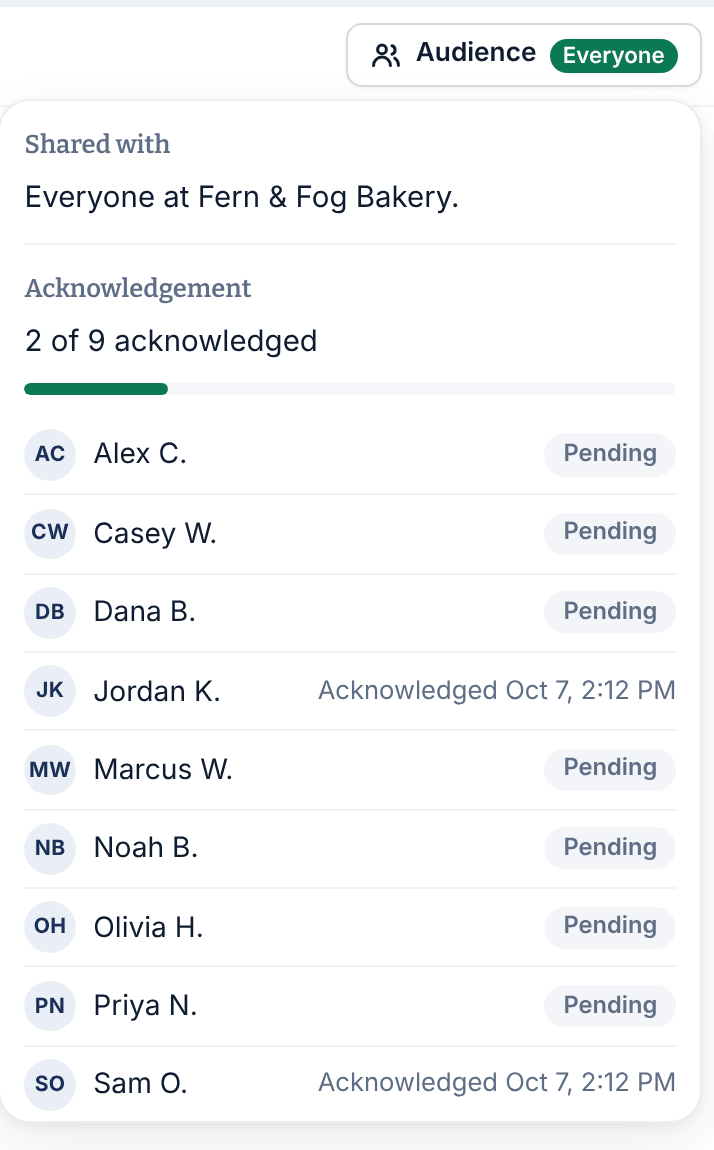
- The list includes everyone the page reaches who has joined Shift Amp, managers who work shifts included. People who haven't accepted their invitation yet aren't listed.
- The list follows the audience. Someone who starts at a location the page is shared with appears as "Pending".
- Assistant managers, and location managers on pages they can't edit, see "Asked of everyone who can see this page." instead of the list.
When you change the page
When you save changes to a page that asks for confirmation, choose one of these under Existing acknowledgements:
- Keep them — this edit doesn’t change the substance.
- Ask everyone to acknowledge again — the content changed in a way they need to see.
If you ask again, everyone goes back to "Pending". In the app, people who had already confirmed see "This page changed — please read it again and confirm."
Was this article helpful?