See estimated labor cost
Labor cost is an estimate of base wages from your rates and hours. Owners and operations administrators see every figure; location managers see totals.
Shift Amp estimates labor cost by multiplying hours by the rate that applies to each person and position. It's an estimate of base wages, not a payroll figure. What you see depends on your role:
- Organization owners and operations administrators see every figure, including the cost of each shift and timecard.
- Location managers see totals for the locations they manage, in Reports only, unless your organization turns this off. They never see a rate or a figure that stands for one person.
- Assistant managers and employees never see cost.
Where cost shows
For owners and operations administrators, an estimate appears:
- on the schedule: the week's total under the grid, each shift's panel, and the Publish schedule panel;
- on each person's timecard in Timesheets;
- in Reports: the cost card on the Overview, the Estimated labor cost report, and the cost table in Paid time off.
Read the Estimated labor cost report
- In the left menu, select Reports.
- In the list of reports, select Estimated labor cost.
- Choose the dates, and a Location if you like.
- Under Group by, choose how to break the figures down, such as Day or Week.
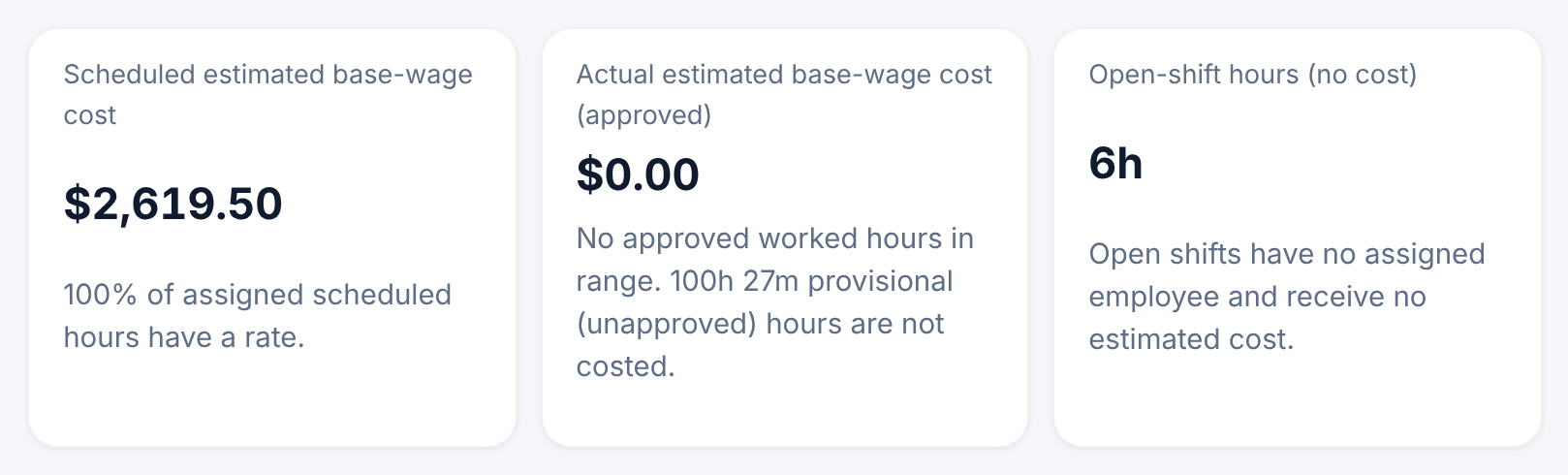
The cards compare Scheduled estimated base-wage cost, for assigned shifts on the published schedule, with Actual estimated base-wage cost (approved), for hours on approved timecards. The table below shows both for each day, week, location or position. Its Completeness column names anything a figure leaves out, and reads "Complete" when nothing is missing.
Owners and operations administrators can also select Hourly rates to see every rate in force today and where each one comes from. To download the table, select Export report CSV. Amounts in the file are in cents, or your currency's smallest unit.
What the estimate leaves out
- Overtime, taxes, tips, benefits and other payroll costs.
- Hours on timecards that aren't approved yet. They're shown as provisional and costed once the week is approved.
- Open shifts, because nobody is assigned to them.
- Hours with no rate. They're listed as missing a rate, never counted as zero. See Set pay rates.
- Salaries. A salaried person's cost is spread across each day of the range on its own line, Salaried employees — allocated to the period, at their home location. Working more hours doesn't change it.
What location managers see
Location managers get the Estimated labor cost report for their locations, grouped by Day, Week or Location. They don't see positions or rates, and a cost figure that would stand for a single employee is withheld; the hours still count.
Owners and operations administrators can turn this view off for location managers. See Set your currency and who sees labor cost.
Was this article helpful?