Know what the week costs before you publish it.
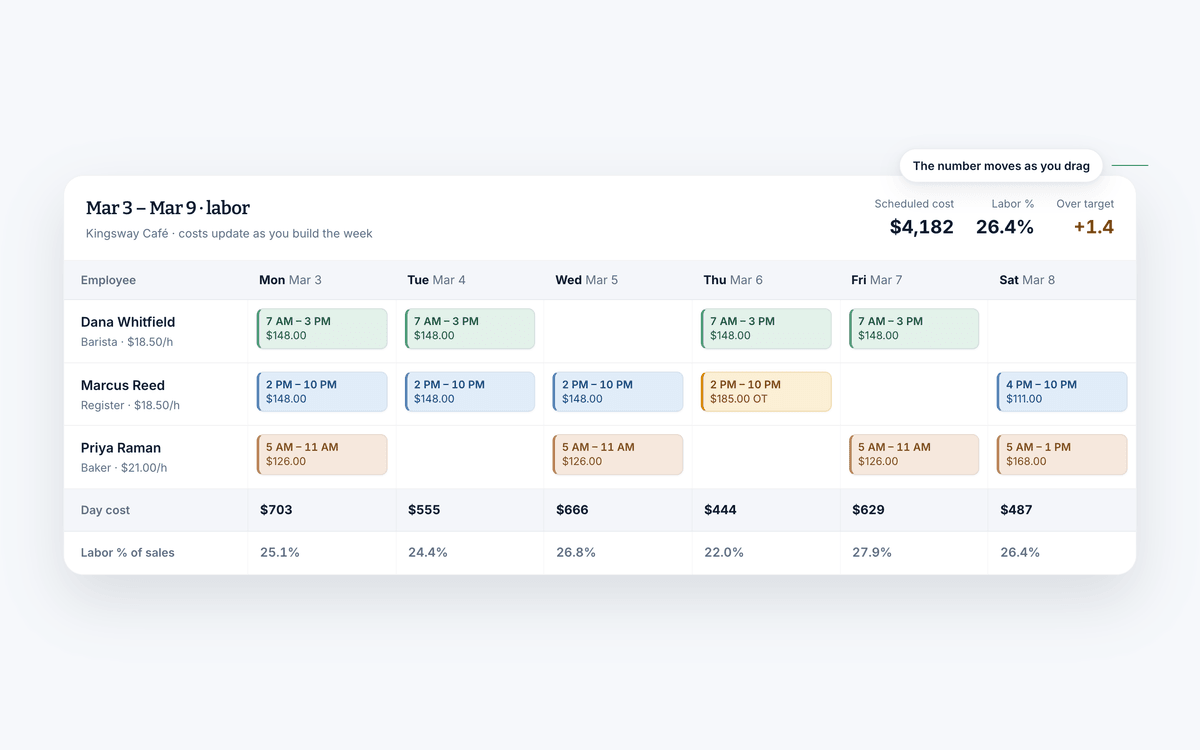
Add pay rates once, and Shift Amp estimates the cost of each shift and the whole week as you build. After timesheets are approved, see scheduled and actual cost side by side.
Free for your whole team. No credit card required.
- Cost updates as you move a shift
- Weekly hours limits while the week is still a draft
- Free for your whole team
What you can do
Get the most out of your largest expense.
Labor cost is easy to review after the fact and hard to change after the fact. All four of these happen while the schedule is still a draft.
Price the schedule as you build it
Assign a wage to each employee or position and the grid starts costing itself. You are making the trade-off with the number in front of you.
- Assign wages to employee profiles or to positions
- See what each shift costs the moment you place it
- Watch the margin per shift, not just the weekly total
- Adjust before the schedule is published, not after
Why it helps
Take control of your cost of labor.
Calculate as you go
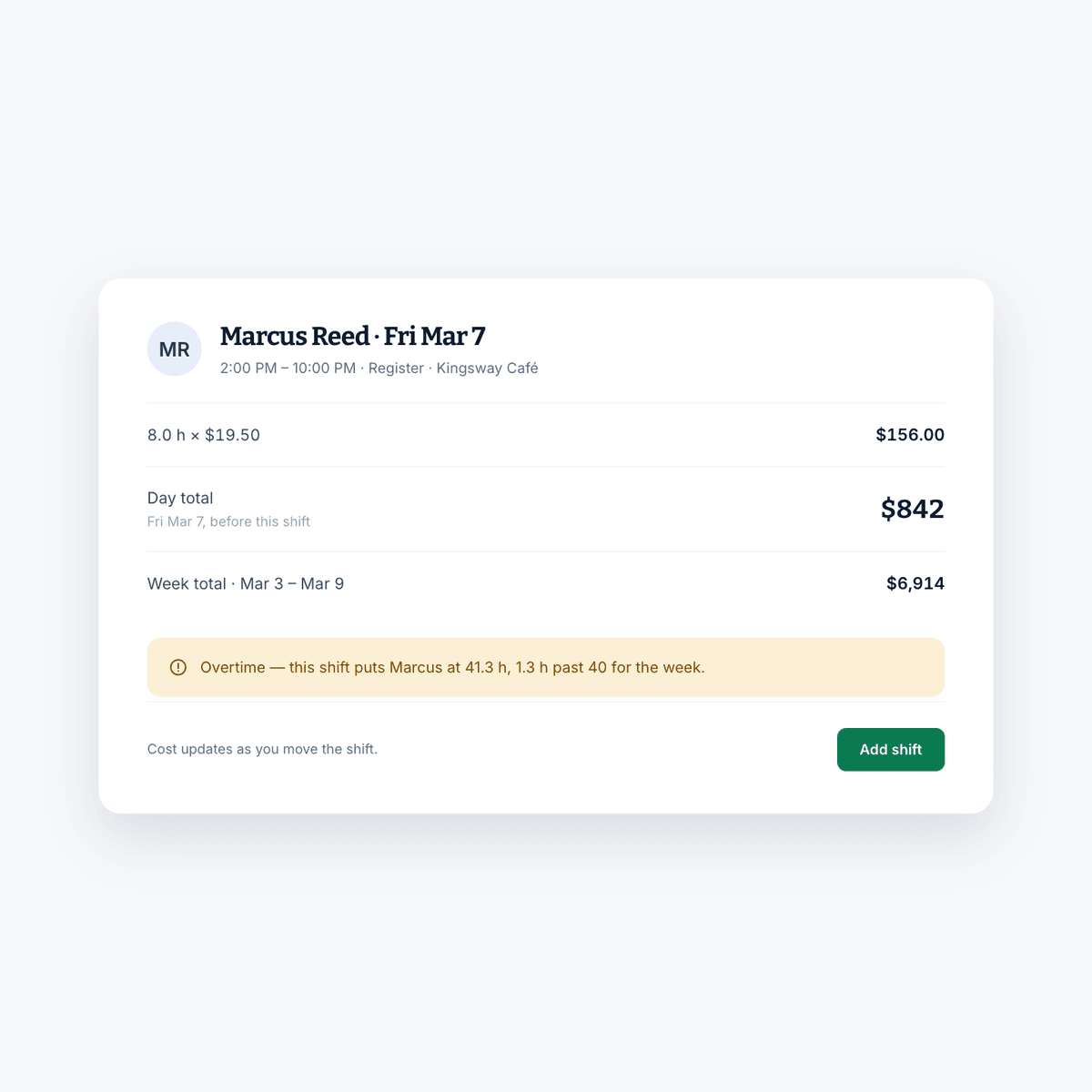
The cost of a shift appears the moment you place it, so the week is priced while you can still change your mind about it.
Head off overtime
A weekly hours limit flags long weeks while the schedule is still a draft, which is the only point where fixing it is free.
Scheduled vs. actual
Once timesheets are approved, see the scheduled cost next to the actual cost.
Compared to
Against finding out at payroll.
Most teams cost their labor once a period, in arrears, from a report. By then every decision has already been made.
| What you get | Shift AmpFree, or $2 per billable member for Pro | Spreadsheet + payroll report |
|---|---|---|
| Cost visible while scheduling | ||
| Long weeks flagged before you publish | ||
| Budget per shift and per location | If you build it yourself | |
| Alerts when the week goes over | ||
| Labor compared against sales | A manual join | |
| Wage changes reflected everywhere | Wherever you remember | |
| Hours imported from the time clock |
What actually counts as a labor cost.
For business purposes, labor cost is everything you pay out to have people working, not just the rate on the offer letter.
- Hourly wages
- Salaried wages
- Payroll taxes
- Overtime
- Health care
- Bonuses
- Sick days
- Vacation days
- Insurance
- Benefits
- Meals
- Supplies
- Training costs
Plenty of managers count only hourly and salaried wages. That is a costly mistake, and it is the reason a schedule that looks affordable on the grid is not affordable on the books.
Why the number matters.
Labor costs can average 30 to 35 percent of a business's total revenue, and in some cases considerably more. They also feed prime cost, which is one of the clearest efficiency metrics you have. Whatever your business spends, it is a large amount of money leaving every year, and without control of it your margin quietly absorbs the difference.
How to calculate it.
The math is straightforward once the expenses are assembled. Assembling them is the slow part. Take a full-time employee paid $13 an hour.
- Gross pay: $13 per hour across 2,080 hours is $27,040.
- Net hours worked: subtract the time actually lost. Ten days of holidays, vacation and illness is 80 hours, which leaves 2,000.
- Other annual costs: insurance, taxes, overtime and benefits for this employee come to $4,000, so annual payroll labor cost is $31,040.
- Actual hourly labor cost: $31,040 divided by 2,000 net hours is $15.52 per hour.
So the person you think of as a $13-an-hour employee costs $15.52 for every hour of actual work. That gap is why scheduling against the wage alone understates what the week really costs.
Bringing it down without cutting pay.
Bringing labor cost down doesn't mean paying your team less. There are better levers, and most of them are scheduling decisions.
- Plan the schedule a month in advance.
- Tabulate the cost as you schedule rather than after.
- Use a rotating shift so the load is spread evenly.
- Cross-train so anyone can fill in at other positions.
- Set clear clock-in and clock-out rules and hold to them.
- Reduce absenteeism.
- Reduce turnover, which carries hiring and training costs with it.
- Watch the trend over time instead of a single period.
Every one of those gets easier when the cost is visible while you are still building the schedule, rather than in a report you read two weeks later.
The rest of Shift Amp
More than a labor cost calculator.
Cost control works best when it is attached to the schedule and the clock.
Employee scheduling
Build the week on a grid, publish it, and approve the changes your team asks for.
Learn moreEmployee time clock
Accurate clock-ins and timesheets that are ready for payroll.
Learn moreMulti-location scheduling
Staff several sites from one schedule and compare them side by side.
Learn moreEmployee breaks
Break rules applied to shifts automatically, with reminders on the floor.
Learn moreTeam communication
Messages, group chats and channels next to the schedule.
Learn moreTask management
Assign the shift's work and see what actually got done.
Learn moreIntegrations
Connect the point of sale, payroll and tools you already run.
Learn moreLabor compliance
Break and overtime rules for every state, kept current.
Learn moreFAQ
Labor costs, answered.
What counts as a labor cost?
Everything you pay to have people working, not just the hourly or salaried wage. Payroll taxes, overtime, health care, bonuses, sick days, vacation days, insurance, benefits, meals, supplies and training all belong in the number. Counting only wages is the most common way businesses underestimate what a schedule costs them.
Why do labor costs matter so much?
Because they are usually the largest cost a business controls. “Why the number matters” above covers the share of revenue and what it means for prime cost.
How do I track labor costs?
It comes down to record keeping and reporting, which is what the software is for. Shift Amp imports hours automatically once your team clocks in and out, applies the wages you have set, and lets you calculate and track cost over whatever period you want to look at.
Does Shift Amp calculate overtime?
No. Shift Amp doesn't calculate pay. You can set a weekly hours limit, though, and anyone scheduled past it is flagged before the week goes out.
Can I compare labor against sales?
Yes. You can view historical and projected sales revenue next to your labor cost, track labor as a percentage of sales, and see when labor is running ahead of the revenue it is supporting.
Can I set different budgets for different locations?
Yes. Budgets are set per shift and per location, so a quiet site and a flagship site can each be measured against a number that makes sense for them.
What does it cost?
Live cost estimates come free with scheduling, for your whole team. Scheduled versus actual cost, labor reports and location comparisons are part of Pro, at $2 per billable member a month, and every new team starts with 14 days of everything free.
Why Shift Amp?
Because we save you time and money. Scheduling is free for your whole team, and Pro is $2 per billable member a month when you want the time clock and reports. We do what we say we'll do, and we'll never waste your time trying to upsell you.
Pricing
All the schedule. None of the bloat.
No add-ons, no per-location fees, no surprises. Just a schedule your whole team can count on, and it's free for all of them.
Free
For any number of people.
- The schedule, with open shifts, shift swaps and coverage
- Availability and time-off requests
- Labor cost estimates as you build the week
- Messaging with photos and documents, and shift tasks
- iOS and Android apps for everyone on the team
- No credit card
Pro
Every member counts, from the first. No cap on team size.
- Everything in Free, plus:
- A time clock on phones and shared kiosks, with location checks
- Timesheets and approvals
- Payroll-ready exports
- Reports on hours, coverage, labor cost and attendance
- Paid time off balances
- A wiki for your team's how-tos
From the blog
Getting labor cost under control.
Guides on calculating, forecasting and lowering the biggest line you manage.

Scheduling Minors: Hour Limits and Work Permits in 20 States
Federal law caps hours only for 14 and 15 year olds, so the real limits on a teen's schedule live in state law. Here is how 20 states compare, with a worked week and the mistakes that cause violations.
October 23, 2026
Can You Change an Employee's Schedule Without Notice? What You Owe, by City
Federal law does not require notice before you change a schedule, but a growing list of cities makes late changes cost money. Here is the default rule, where it flips, and what each change costs.
October 22, 2026

Open Shift Pickup Rules: First-Come, Seniority, or Lottery
Who gets the open shift? A vendor-neutral guide to first-come, seniority and lottery pickup rules, the overtime check most policies skip, and a copy-paste policy.
October 21, 2026
Find out what next week costs.
Start free, add your wages, and price your first schedule before you publish it.
Free for your whole team. No credit card required.