Let managers see other locations
Turn on Manager cross-location view in Settings, and location managers and assistant managers can read every location's schedule without changing it.
Location managers and assistant managers normally see only the schedules of the locations they manage. Owners and operations administrators can let them read every active location's schedule as well, so that Dana at Downtown can check who's working at Riverside. They still can't change anything at a location they don't manage. Owners and operations administrators always see every location.
Turn it on
- Open the account menu at the bottom of the left menu (your name), select Settings, then select Scheduling.
- Under Manager cross-location view, for Managers can read other locations, select All locations, read-only.
- Select Save policy, then select Save policy again to confirm.
It applies to every location manager and assistant manager at once. To turn it off, choose Only their own and select Save policy.
What managers see
Other locations now appear on their Schedule, next to their own. A note above the week names the locations they can only view. It reads "Some of this week is view-only." when their own locations are on screen too, and "You can view this week, not change it." when every location on screen is one they don't manage.
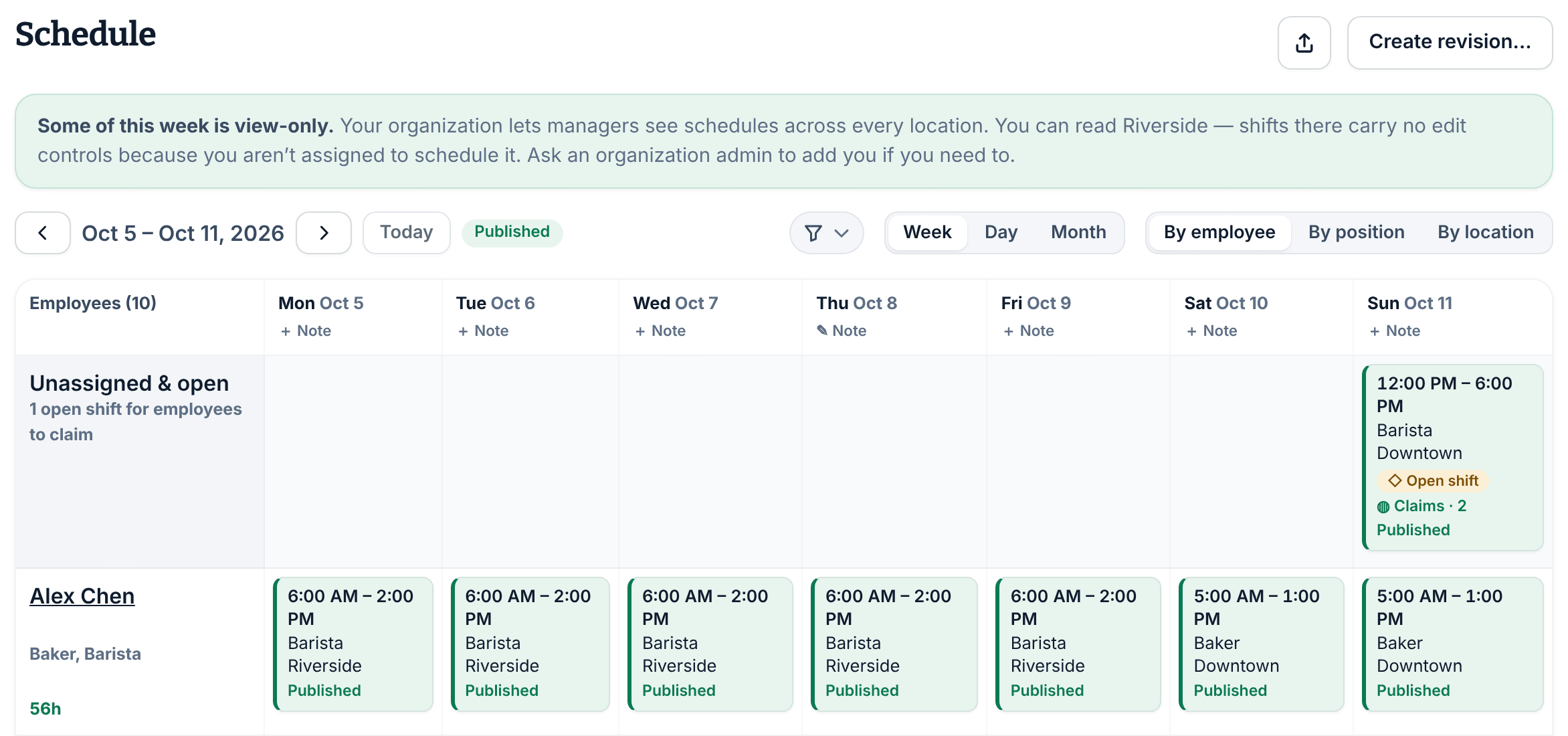
At locations they don't manage, shifts have no edit controls on the schedule, and any change they try there, even to a shift's notes, is refused. Creating, editing, assigning, publishing and approving all stay limited to the locations each manager manages.
To give someone the right to change another location's schedule, add that location to the locations they manage. See Change someone's role.
Was this article helpful?