Schedule people at more than one location
Add each location to a person's record, then schedule them at any of them. Shift Amp never lets one person hold overlapping shifts, wherever they are.
People can work at more than one of your locations. Sam Ortiz, for example, works at both Downtown and Riverside. Add each location to someone's record, and they can be scheduled at any of them. Positions count everywhere: a Barista is a Barista at every location.
Let someone work at another location
Add the location to the person's record. See Change someone's locations and positions.
Location managers and assistant managers schedule only at the locations they manage, but they can schedule anyone who works there, whatever that person's home location is.
Schedule them
On the Schedule, a person's row shows their shifts at every location you have on screen, and each card names its location. To see one location at a time, use Filters (the funnel icon) and choose it under Locations. To group the week by location instead, select By location.
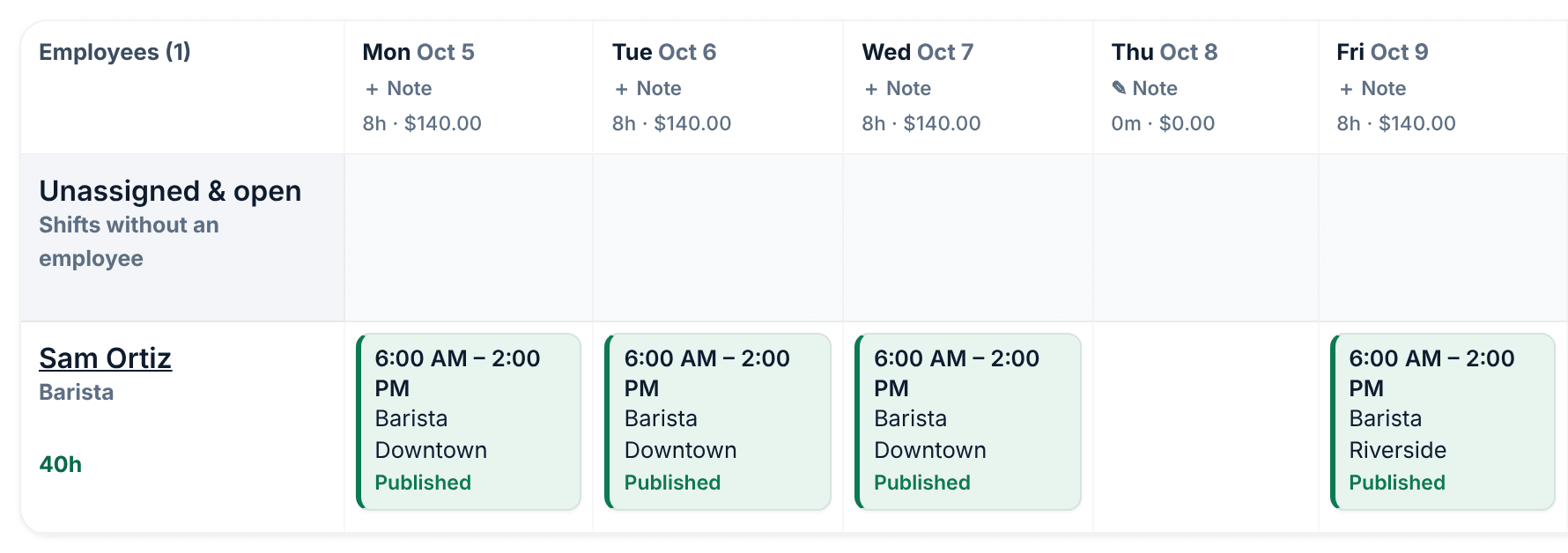
Shift Amp looks at every location, not only the ones on screen:
- No double-booking. You can't give someone a shift that overlaps one they already have, at any location, in a draft or a published week, and this can't be overridden. Back-to-back shifts are fine.
- Locations you can't see count too. A location manager may see someone listed as eligible, but saving a shift that overlaps one they have at another location is refused with "This employee already has a shift that overlaps these times."
- Weekly hours. If your organization has a weekly hours limit, it counts the person's hours at every location. See Set a weekly hours limit.
How time zones work
Each location has its own time zone, and every shift there is entered and shown in that location's local time. A 9:00 AM shift starts at 9:00 AM where the location is, whoever is looking at it.
- The schedule shows each location's own local times. Printed schedules and CSV files name the time zone.
- Employees see each shift in its location's time zone. When that's different from their home location's time zone, the time shows a short label, such as CDT.
- Hours count a shift's real length, even when it crosses a daylight saving time change.
- Overlap checks compare the real moments in time, so shifts in different time zones are checked correctly.
Publish several locations
Each location's week is published on its own. When more than one location has a draft on screen, Publish… offers Publish all locations, which publishes them together. To publish only some, use Filters first. See Publish a week.
Was this article helpful?