Add people past the free plan
At 10 billable members, adding someone new stops until an owner sets up billing. Nothing you entered is lost, and nobody else is affected.
The free plan covers up to 10 billable members. When adding someone would make an 11th, Shift Amp stops before anything is created, and an organization owner needs to set up billing. Nothing you entered is lost, and everyone's schedules, notifications and time clock carry on as usual.
What owners see at the free limit
The Your team is growing dialog opens. It shows your new number of billable members and what the plan will cost each month. Select Set up billing to continue, or Not now to stop. See Set up billing.
What other managers see at the free limit
Operations administrators and location managers see Your team has reached the free plan, with a message such as "Your team has reached the free limit of 10 billable members, so Taylor Reed can’t be added yet."
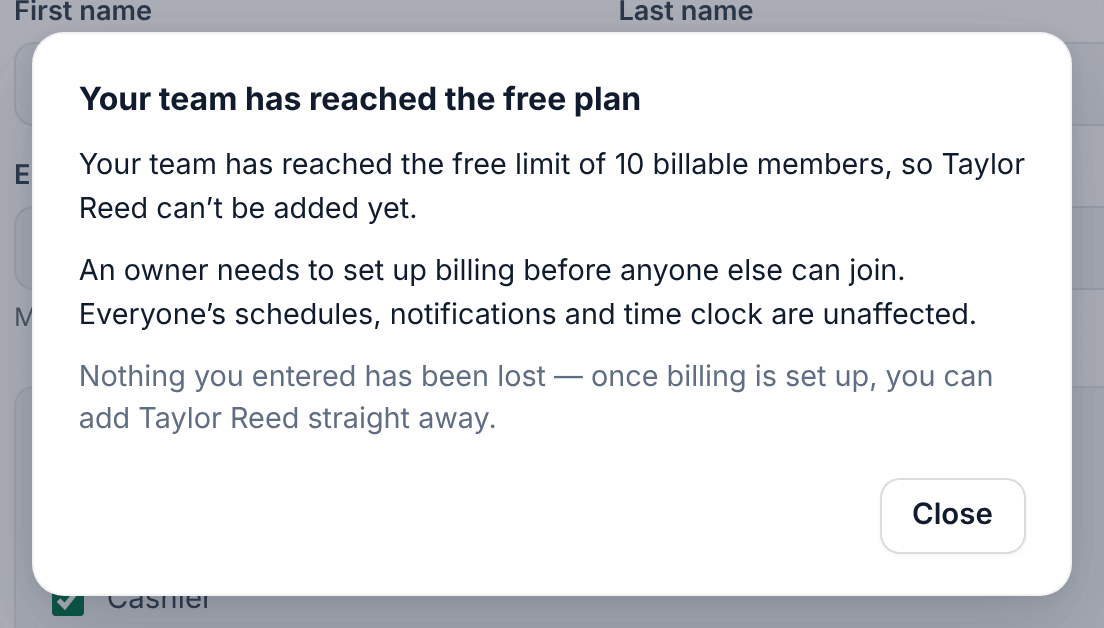
- Select Close.
- Ask an owner to add the person. Adding them is how the owner sets up billing.
Nothing is saved for the owner, so they enter the person's details again. Once billing is set up, you can add people as usual. Don't add the same person yourself afterward: their email address will already be in use.
Assistant managers can't add people at all.
Reactivating someone past the free limit
Reactivating an archived person who didn't count this period makes them a new billable member, so it can stop in the same way. Reactivating someone who already counted this period costs nothing more and is never stopped by the limit.
Archiving doesn't make room until next period
Archiving someone doesn't free a place until the next billing period. At 10, archiving one person and adding a replacement still makes 11 this period. See How billing works.
Importing a team past the free limit
An import that would take you past 10 is refused as a whole, and nobody is added. Either import fewer people, or have an owner set up billing first by adding one person on their own, then import the rest. See Import your team from a spreadsheet.
During first-time setup, the owner counts as one of the 10, so up to 9 other people can be added there.
Was this article helpful?