Work for more than one business
One account can belong to several organizations. Switch between them from the organization menu on the web, or from More in the app.
You can work for several businesses with one Shift Amp account, for example two employers, or a business you run and another where you work shifts. Each business is its own organization in Shift Amp, with its own schedule, requests, messages and notifications. You sign in once and switch between them.
Join another organization
When another business invites you, open the invitation and sign in with the email address you already use. If you're asked, select Sign in rather than Create account. The invitation has to be sent to that exact address. See Join your team on Shift Amp.
Switch on the web
Once you belong to two or more organizations, the current organization's name appears at the top of the left menu, under the Shift Amp logo.
- Select the organization's name at the top of the left menu.
- Select the organization you want. A ✓ marks the one you're in.
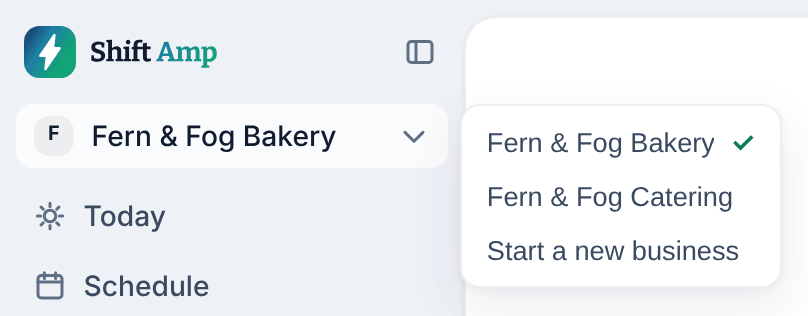
Shift Amp opens that organization's Today page. What you see in the left menu depends on your role there. Your browser remembers the organization you used last.
Switch in the app
- Select the More tab (three dots).
- Select Switch organization. It appears when you're on the team at two or more organizations.
- If you're clocked in, the app reminds you that switching doesn't clock you out. Select Switch anyway, or Cancel and clock out first.
- Select the organization.
The app remembers your choice on this phone. If it doesn't know which organization you want, for example the first time you sign in, it asks you to Choose an organization. If you select a notification from another organization, the app asks whether to switch to it.
What each organization keeps separate
- Notification settings and shift reminders, your notification history, your photo and your calendar link belong to one organization. Set them up in each.
- Your display choices, such as time format and how names are written, apply everywhere.
- Your phone gets notifications from every organization you belong to, following each one's settings.
Start another business
- On the web, select the organization's name at the top of the left menu.
- Select Start a new business.
- Complete the setup steps for the new business. See Set up Shift Amp for your business.
You become the new business's Organization owner, and your other organizations aren't affected. If you leave before setup is finished, the business shows Finish setup in the menu. Select it to carry on where you left off.
Was this article helpful?